AI file organizer for Mac: sort documents by content.
OCDify reads documents with a language model that runs on Apple Silicon, files them into categories you choose, and suggests names you can search for. No uploads, no account, no subscription.

Free to download and use. One folder, four categories, automatic sorting, and undo. No time limit. Apple Silicon · macOS 14+
What makes it an AI organizer
Rule-based organizers can use filenames, dates, types, and content conditions you define. An AI organizer interprets readable document text and matches it to the categories you describe. OCDify can suggest Finance for an invoice called Scan001.pdfbecause of its contents, even when the filename offers no useful clue.
See a content-based filing result in History
For a category such as Finance, describe what belongs there: “invoices, receipts, and payment confirmations.” A readable invoice named Scan001.pdf can then be classified by its contents. With Full Unlock and Smart Rename enabled, OCDify can also give it a descriptive filename while organizing.
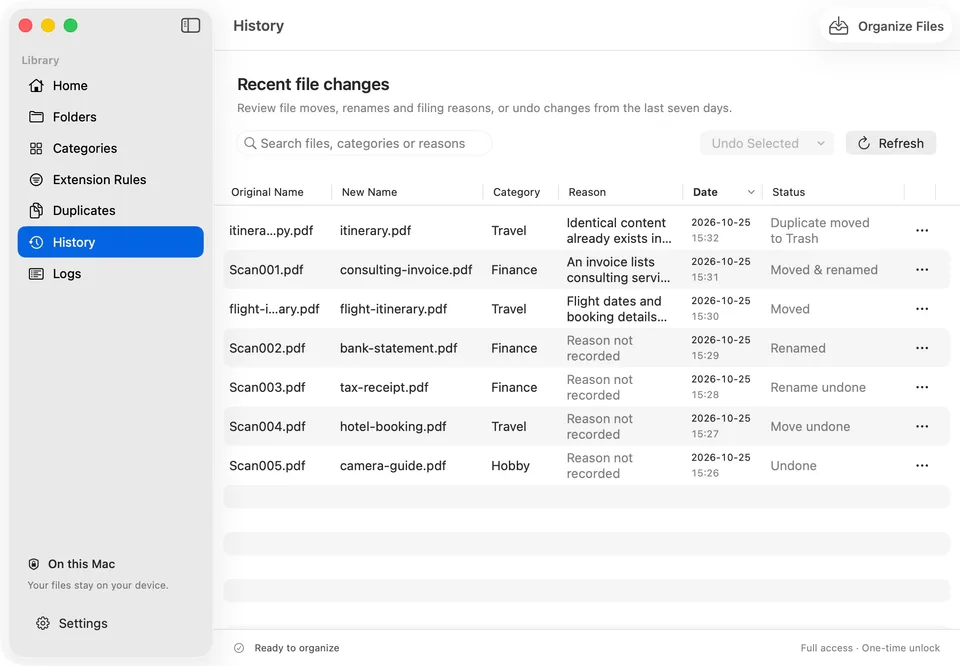
Test your own document copies and check the destination and reason in History. Free access includes sorting one folder into up to four categories and seven-day undo. Smart Rename and OCR require the one-time Full Unlock. For setup, follow the first-folder walkthrough.
Why local AI matters for files
The files in a Downloads folder are often the most personal on a Mac: payslips, contracts, bank statements, medical letters, ID scans. A cloud AI organizer has to send their contents somewhere to understand them. OCDify’s model runs on your Mac, so it reads them where they already are.
- No file contents or filenames are uploaded for analysis.
- No Meld Origins account is needed.
- It keeps working without a connection once the model is installed.
What it organizes
Content analysis covers readable PDF, DOCX, TXT, Markdown, RTF, EPUB, CSV, XLSX, and PowerPoint files. Photos, videos, and audio are grouped into their own folders by extension, without loading the model. Only top-level files in folders you select are organized; existing subfolders are left alone.
With Full Unlock, on-device OCR reads scanned PDFs and text-bearing images using Apple Vision. It checks up to the first five PDF pages. Protected or unreadable files may still be skipped.
Staying in control
- Smart Rename applies descriptive names during organization with Full Unlock. Review original and new names in History. Meaningful names are kept.
- Folder watching files new downloads as they arrive; pause it from the menu bar.
- History keeps seven days of changes. Undo the move, the rename, or both.
Questions
What does an AI file organizer do?
It reads what a file contains, decides which category it belongs to, and moves it there, so you do not have to write rules or file by hand. Some also suggest descriptive filenames. OCDify does this for folders you choose, such as Downloads or Desktop.
Does OCDify need an internet connection?
Only for setup and the App Store. OCDify downloads its language model once (about 2.4 GB). After that, reading, sorting, and renaming work offline, including in Airplane Mode.
Does OCDify use ChatGPT or another cloud AI?
No. Classification and rename suggestions come from a model running locally on your Mac's Apple Silicon. File contents, filenames, category descriptions, and suggestions are not sent to a server.
Which Macs can run OCDify?
Macs with Apple Silicon (M1 or newer) running macOS 14 or later, with at least 3 GB of free space for the model.
Start with one folder.
Download OCDify free from the Mac App Store and get started on your work documents.
Free to download and use: one folder, four categories, automatic sorting, and undo. Optional Full Unlock is available in the app.
Apple Silicon · macOS 14+